
Written by: Hennie Brink on Dec 7, 2023
Choosing between Gaggle and FlySkyHy usually starts with a practical question: which app fits the way you fly, the phone you carry, and the information you want in the air? Both apps can be useful for free-flight pilots, but they take different approaches. FlySkyHy is an established iPhone-focused flight instrument with deep customization and optional extensions. Gaggle is available on iOS and Android, with flight recording, live tracking, airspace tools, weather, routes, 3D replay, and community features built around recreational paragliding and paramotor flying.
This comparison is written for pilots evaluating apps, not for declaring a universal winner. If you want to compare Gaggle’s plan limits and included features after reading, see the Gaggle pricing page. If you are still learning the basics, our beginner guides to paragliding instruments and paragliding weather are useful background.
FlySkyHy: A Veteran in the Sky
For over a decade, FlySkyHy has carved its niche as a go-to app for iPhone-using paragliding pilots. Renowned for its robust and highly customizable interface, FlySkyHy is celebrated for delivering a comprehensive suite of features that cater to the essentials of paragliding. With its impressive list of functionalities – from advanced flight instrumentation to detailed post-flight analysis – it has become an indispensable tool for thousands of pilots globally. While it may not support Apple Watch or iPad, its iPhone-centric design ensures that pilots have a reliable flight instrument always within reach. The app’s emphasis on safety, evident through features like wind direction and strength indicators, makes it a staple in the pilot’s toolkit.
Gaggle: The New Wave of Airborne Connectivity
On the other hand, Gaggle, though a relatively newer player, has gained traction within the paragliding and paramotoring (powered paragliding) communities. Developed by a passionate paramotor pilot, Gaggle brings a fresh perspective to flight apps. If you specifically need an Android-focused answer, see our FlySkyHy alternative guide for Android users. Its compatibility across iOS and Android platforms, including watch and tablet support, broadens its appeal. Gaggle sets itself apart with its emphasis on social networking and community features, transforming the solo flight experience into a shared adventure. With functionalities like live location tracking, emergency contacts, integrated flying sites, and weather reports, Gaggle positions itself as an all-encompassing tool for pilots. The integration with bluetooth devices and SafeSky, coupled with audio cues for crucial flight information, underscores Gaggle’s commitment to safety and convenience. Pilots comparing by discipline can also look at Gaggle for paragliding or paramotor flying.
As we delve deeper into the features of FlySkyHy and Gaggle, we’ll explore how these apps not only cater to the technical demands of flying but also enhance the overall experience by fostering a sense of community and safety among pilots.
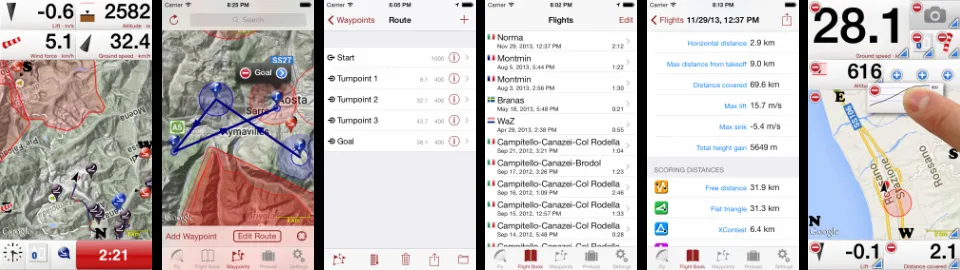
FlySkyHy has established itself as a leading app in the paragliding and hang gliding community, known for its robust features and a user-friendly interface designed for iPhone users. It combines advanced flight technology with practical tools to enhance the flying experience. Here’s an in-depth look at FlySkyHy’s features:
Advanced Flight Instrumentation: Displays critical flight data such as altitude, climb rate, ground speed, airspeed, direction, glide angle, wind direction, and strength.
Interactive Map: A dynamic map that shows the current flying position, flight trail, thermal activity, and decline spots.
Landing Spot Analysis: Provides information on the nearest landing spots, factoring in altitude and wind direction.
Bluetooth Vario Compatibility: Supports various devices for enhanced altitude and lift data, transforming the iPhone into a GPS-vario with vario tones.
GPS-Vario Transformation: Offers comprehensive GPS-vario functionality.
Extensive Flight Logging: Detailed logs include start/landing positions, flight duration, altitude graph, scoring distances, and FAI triangle records.
Live Location Sharing: Allows for live tracking on platforms like livetrack24.com, loctome.com, etc.
Friend Tracking in Flight: Displays real-time locations of friends, enhancing the group flying experience.
Customizable Display Screens: Offers multiple, fully configurable flight display screens.
Optimized for Various Airsports: Ideal for paragliding, hang gliding, and other airsports.
Comprehensive Logbook: Records all flights with extensive data.
In-Depth Flight Analysis: Provides basic flight data, distance metrics, and altitude/climb rate graphs.
Competition-Ready Log Files: Generates signed IGC and KML log files for competitions.
Flight Sharing and Replay: Options to transfer logs to iTunes, email, upload to flight platforms, and replay flights in Google Earth.
Advanced Waypoint Mapping: Features a fully zoomable map with waypoints, optimized routes, start/landing spots, and restricted airspaces.
Waypoint and Route Management: Enter and manage waypoints, with full route support including start time, goal, and entry/exit points.
Navigation Instruments: Assortment of tools for route guidance.
Waypoint Notifications: Provides audible and visible alerts upon reaching waypoints.
Comprehensive Organizer: Manage, import, and export waypoint files in various formats.
Global Airspace Data: Access to airspaces for many countries, with current coverage depending on the app version, extension, and region.
Customizable Airspace Display: Tailors colors and formats on the map.
Vertical Positioning: Shows vertical relation to nearby airspaces.
Proactive Airspace Alerts: Warnings for approaching and entering airspaces.
Local Airspace Exploration: Allows users to touch a map spot to view airspaces in that area.
Multiple Server Support: Compatible with various tracking servers.
Automatic Tracking: Continuously shares location during flight.
Pilot Display on Map: Shows live locations of other pilots using the same tracking servers.
Customizable Pilot Icons: Personalize the appearance of other pilots and friends on the map.
FLARM Integration: Displays FLARM-reported pilots with separate configuration options.
Enhanced Group Flying: Track friends with configurable icons and details.
Easy Sharing of Tracking Details: Share tracking IDs via QR code or export options.
FlySkyHy’s comprehensive suite of features demonstrates its commitment to providing pilots with a reliable, versatile, and detailed flying tool. The app’s focus on advanced instrumentation, flight logging, and interactive mapping, combined with social and tracking functionalities, makes it a popular choice among flying enthusiasts. In the next section, we will compare these robust features with Gaggle’s offerings to understand how each app serves the needs of different pilots in the airsports community.
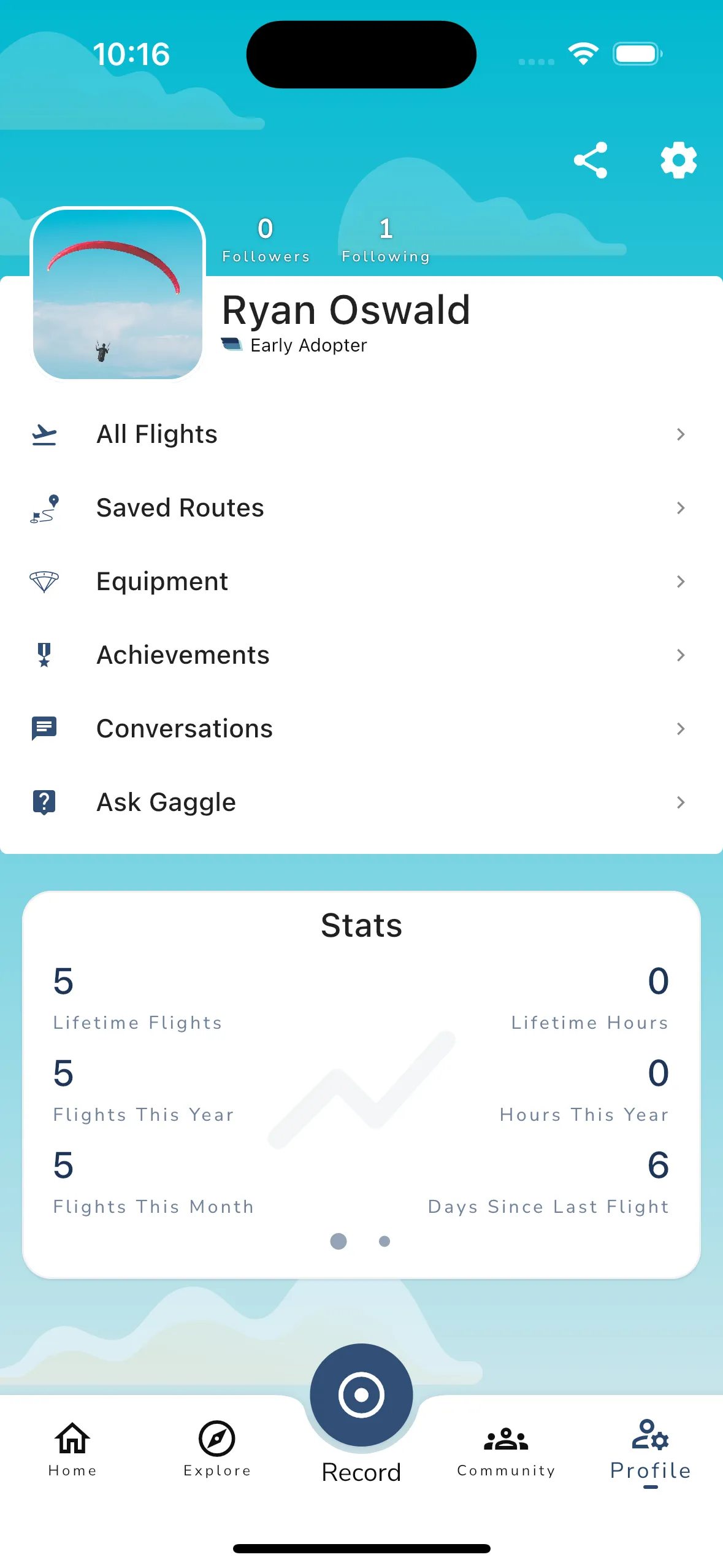
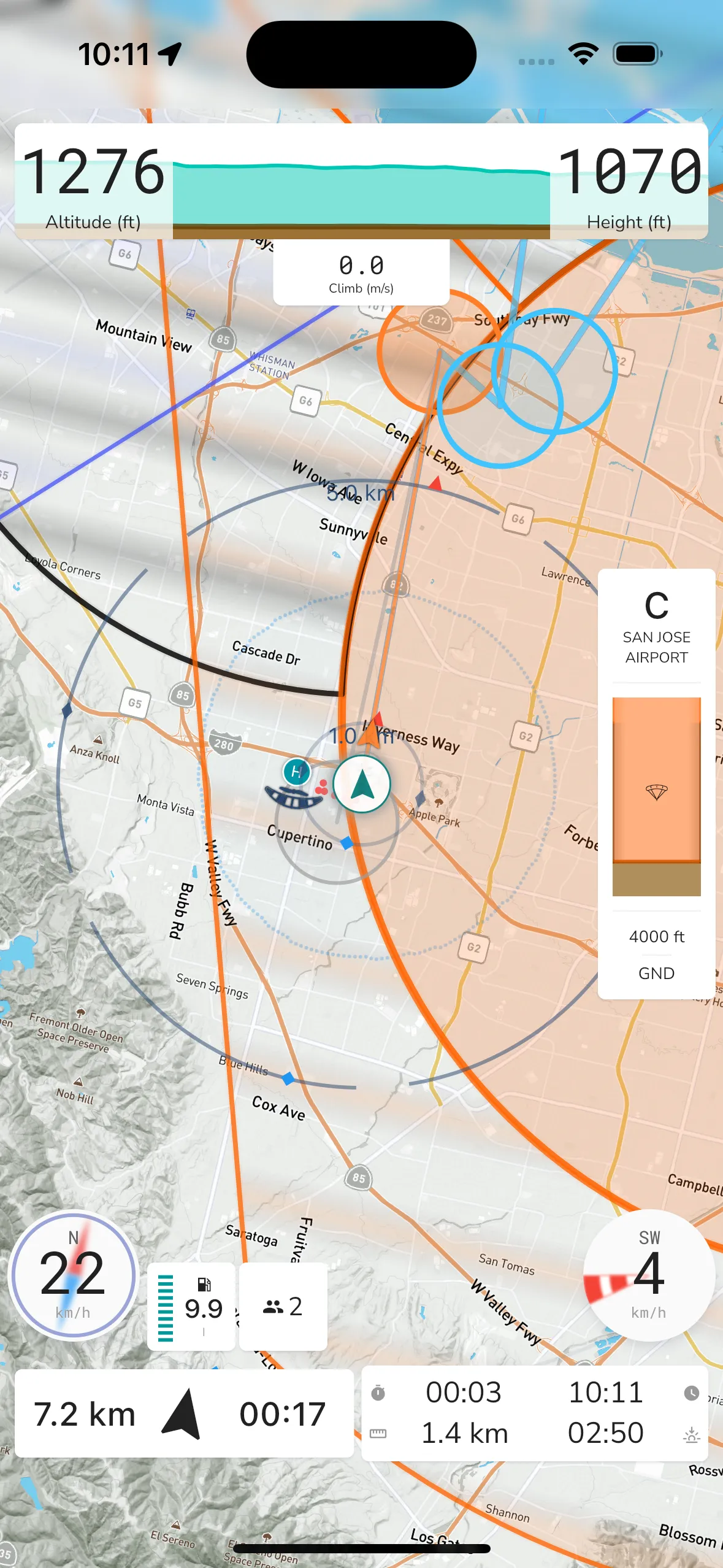
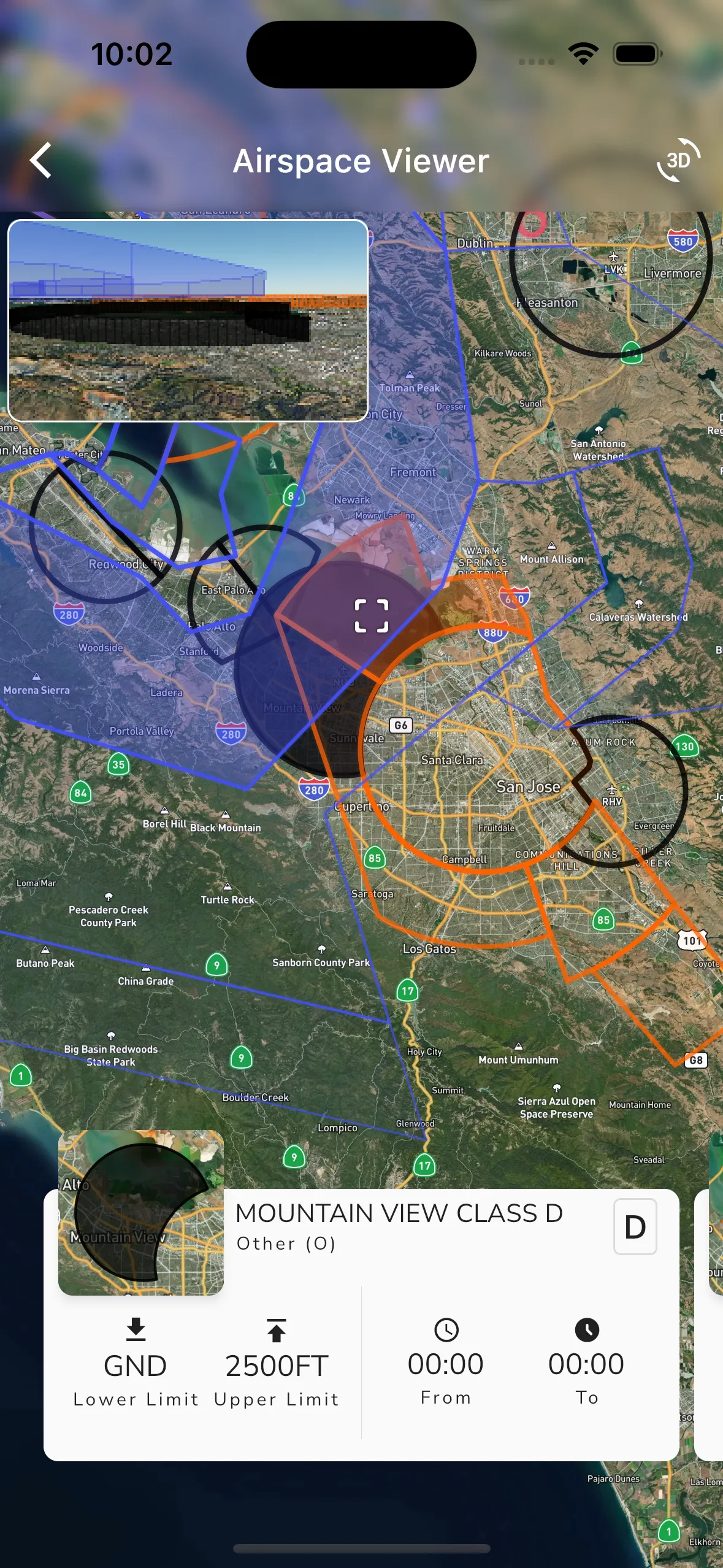
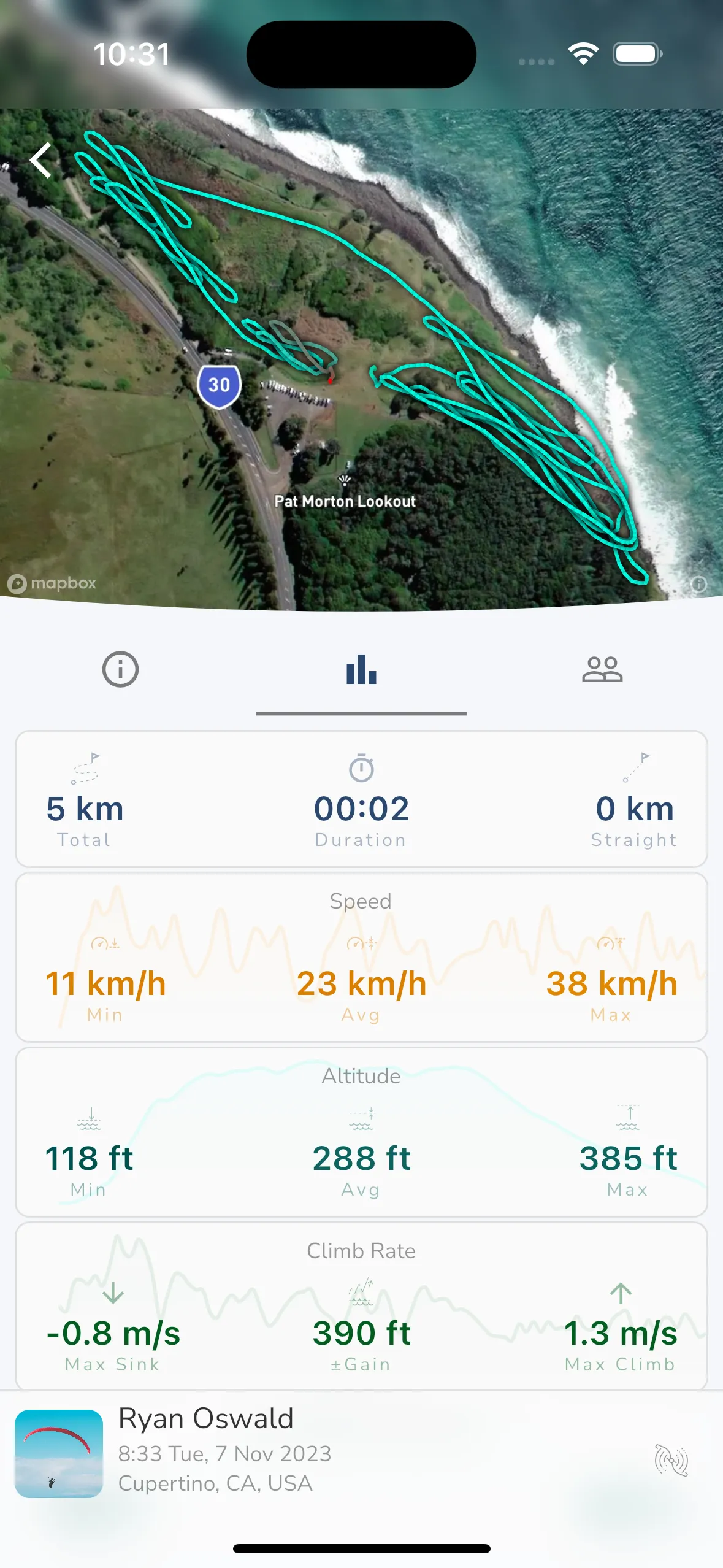
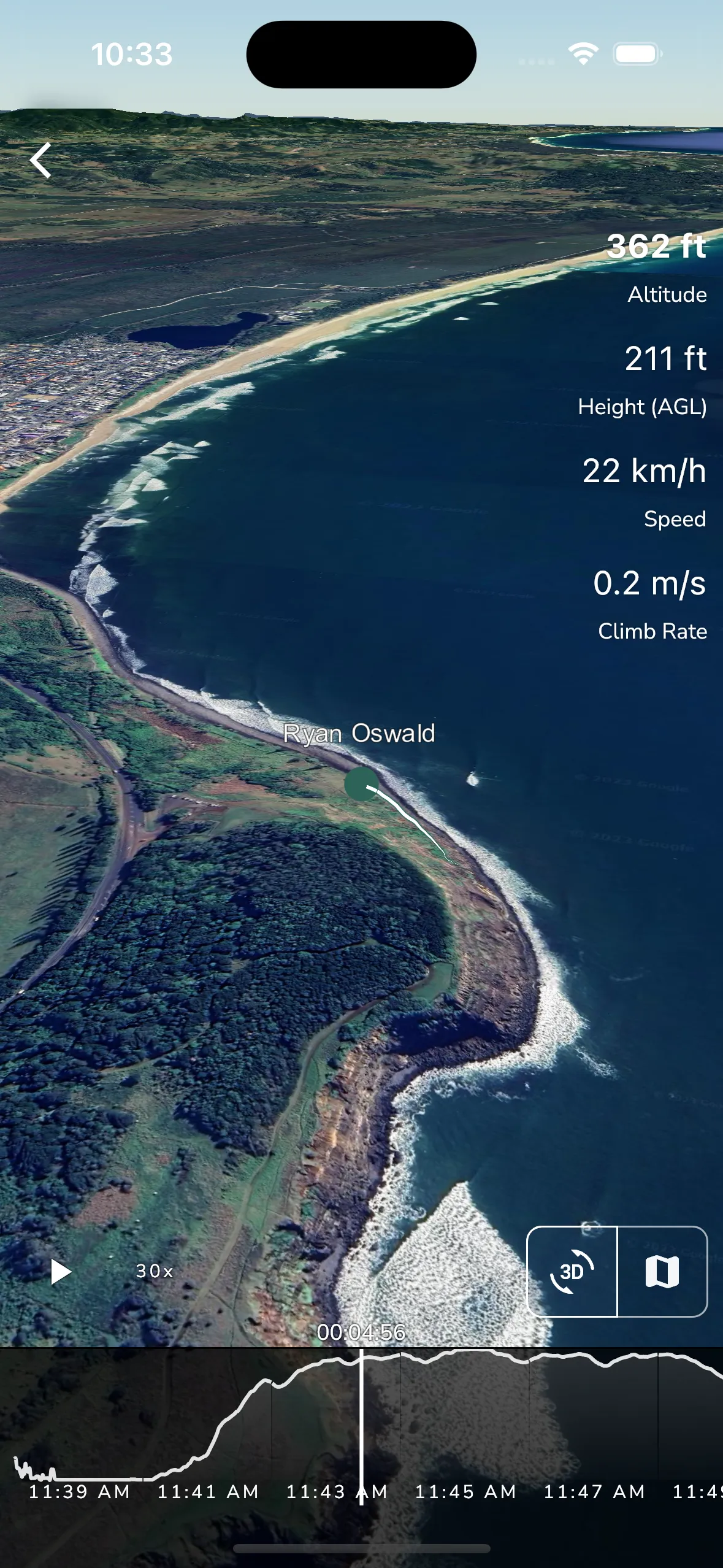
Gaggle, although a newer entrant in the aviation app market, has quickly established itself as a versatile and comprehensive tool for pilots. Its wide array of features not only caters to the technical needs of flying but also enriches the overall flying experience with its unique community and social networking elements. Let’s delve into the diverse functionalities that Gaggle offers:
Airspaces Widget: Displays nearby airspaces, enhancing situational awareness. Altitude Indicators: Shows current MSL/Pressure Altitude and Height Above Ground, crucial for flight safety.
Audio Cues: Provides important flight information via Bluetooth headphones, allowing pilots to stay informed without constant screen monitoring.
Friends Feature: Enables pilots to see and message friends in flight, fostering a sense of camaraderie and shared experience.
Fuel Level and Engine Monitoring: Essential for paramotor pilots, with features like estimated fuel remaining, engine temperature, and RPM.
Navigation Tools: Includes ground speed, compass, and various map views (Terrain, Satellite, USA Sectional).
Automatic Flight Detection: Recognizes takeoff and landing, streamlining the flight logging process.
Route and Waypoint Management: Facilitates navigation with routes, waypoints, and automatic routing back to takeoff.
Thermal Assistant and Variometer: Assists in identifying and utilizing thermals effectively.
Wind Analysis: Calculates wind speed and direction using real-world conditions.
SafeSky Integration: Alerts about nearby aircraft, enhancing in-flight safety.
Automated Recording: Keeps a personal flight log with automatic recording of flights. Post-Flight Analysis: Offers a detailed view with key metrics and graphs for each flight.
3D Flight Replay: Links friend recordings for an immersive 3D replay experience.
Export Options: Flights can be exported in formats like IGC, GPX, KML.
Global Coverage: Includes airspaces for many of the popular flying countries.
Custom Airspaces: Allows adding personal airspaces.
3D Airspace Viewer: Offers a three-dimensional view of airspaces, enhancing understanding and planning.
Global Flying Sites: Provides guides, directions, wind conditions, and live weather forecasts for sites worldwide.
Route and Point of Interest Sharing: Features both private and public routes and points of interest, encouraging exploration.
Social Connectivity: Enables viewing of live tracking and recordings of nearby pilots and groups.
Messaging: Facilitates communication with other pilots, fostering a supportive community.
Group Notifications: Alerts about group activities, enhancing group flying experiences.
Automatic Tracking: Monitors flight hours for equipment.
Ability to Add Gear: Allows adding equipment and gear for tracking.
Device Compatibility: Pairs with Bluetooth, FLARM, and GDL90 devices, ensuring a wide range of usability.
Personal Records: Tracks personal bests and flight statistics.
Excel Export: Allows flight logs to be exported to Excel for further analysis or to submit for license renewals.
Flight History: Displays a detailed history of all flights.
3D Replay: Offers a 3D replay of flights, enhancing the post-flight analysis experience.
Flight Sharing: Allows sharing of flights with friends and groups.
Flight Statistics: Provides detailed statistics for each flight.
Flight Summary: Displays a summary of each flight, including key metrics and graphs.
Gaggle’s blend of technical prowess and social engagement features makes it a standout choice for pilots seeking a comprehensive flying tool that extends beyond the cockpit. It not only aids in flight planning and analysis but also nurtures a sense of community among pilots, making it more than just a flight assistance app. In the next section, we’ll compare these features with those of FlySkyHy, providing insights into how each app meets different pilot needs and preferences.
| Question | FlySkyHy | Gaggle |
|---|---|---|
| Platform availability | iPhone-focused app for iOS pilots | iOS and Android app, with watch and tablet support |
| Flight recording | Detailed flight logs, analysis, and export options | Automatic recording, logbook, stats, exports, and 3D replay |
| Live tracking | Supports live sharing through configured tracking services | Built-in live tracking for friends, groups, and nearby pilots |
| Weather and flying sites | Useful flight-planning context through map and extensions | Flying-site forecasts, wind context, and Explore tools |
| Airspace | Optional airspace extension with alerts and map display | Airspace map, alerts, personal airspaces, and 3D airspace viewer |
| Routes and waypoints | Strong waypoint and route tooling via extension | Routes, waypoints, points of interest, and return-to-takeoff tools |
| Community | Friend tracking through live-tracking setup | Groups, messaging, meetups, nearby pilots, and shared recordings |
FlySkyHy is a strong fit if you fly with an iPhone and want a highly configurable cockpit-style instrument. Gaggle is a strong fit if you want one app across Android and iOS that combines recording, live tracking, planning, and community. Availability and feature parity can vary by device, operating system, region, and account status, so check the current app listings before choosing. For map-first research, Gaggle also has a dedicated paragliding map page.
In this section, we delve into a feature-by-feature comparison of FlySkyHy and Gaggle, highlighting their respective strengths and potential drawbacks. This comparison aims to provide a clear perspective on how each app caters to the diverse needs and preferences of paragliding and hang gliding pilots.
FlySkyHy: FlySkyHy is best known as an iOS app. For pilots who already fly with an iPhone and like a dedicated, configurable instrument, that focus can be a benefit.
Gaggle: Gaggle is available for both iOS and Android, which matters for mixed groups, pilots switching phones, and clubs that do not want to recommend a platform-specific app. Exact feature support can vary by device, operating system, country, and plan.
Edge: Gaggle, for cross-platform availability.
FlySkyHy: Offers extensive flight tracking with detailed logs, including altitude graphs and scoring distances. Live location sharing on platforms like livetrack24.com enhances safety and connectivity.
Gaggle: Also provides robust flight tracking but goes a step further by integrating social features. Pilots can see and message friends in real-time, enhancing group flying experiences. The integration with SafeSky for nearby aircraft alerts adds an extra layer of safety.
Edge: Gaggle, for its social connectivity and safety features.
FlySkyHy: Features customizable display screens, allowing pilots to tailor their flight information layout. Its interface is optimized for iPhone users, offering a familiar and user-friendly experience.
Gaggle: Supports a broader range of devices, including watches and tablets, making it more versatile. Its interface is designed to be intuitive across different platforms, including Android devices.
Edge: FlySkyHy, for its customisable display.
FlySkyHy: Provides in-depth post-flight analysis with competition-ready log files, flight sharing, and replay options. Its focus is more on detailed flight data and performance analysis.
Gaggle: Also offers rich after-flight analysis with key details and graphs. Unique to Gaggle is the ability to link friend recordings for a 3D flight replay, enhancing the post-flight review experience.
Edge: FlySkyHy, for its comprehensive data and competition-ready logs.
FlySkyHy: FlySkyHy’s map, waypoint, and route tools are useful for pilots who want to configure task-style navigation and plan around known waypoints and airspace.
Gaggle: Gaggle combines flying sites, live weather context, routes, waypoints, points of interest, and return-to-takeoff navigation. That makes it especially useful for recreational pilots who want planning and recording in the same app.
Edge: Depends on flying style. FlySkyHy is strong for configurable waypoint workflows; Gaggle is strong for site-based planning and everyday recreational flights.
FlySkyHy: Covers airspaces for many countries, with customizable displays and proactive alerts. It excels in providing detailed airspace data and warnings.
Gaggle: Offers airspaces for major countries and the unique feature of adding personal airspaces. The 3D airspace viewer is a standout feature, providing an immersive way to understand airspace layouts.
Edge: Gaggle, for its 3D airspace viewer and personal airspace addition.
FlySkyHy: While it has live tracking and friend location features, it lacks the broader community engagement features found in Gaggle.
Gaggle: Excels in this area with its community-centric features like live tracking of nearby pilots, group notifications, and messaging options. It essentially doubles as a social network for pilots.
Edge: Gaggle, for its comprehensive community engagement tools.
FlySkyHy’s social features are mainly about live tracking and friend visibility. Gaggle goes broader with groups, messaging, shared recordings, local pilot discovery, and meetups. That does not make every pilot need those features: some pilots prefer a focused instrument. But for schools, clubs, paramotor groups, and pilots trying to find others to fly with, the community layer is a meaningful difference.
Choose FlySkyHy if you fly with an iPhone, want a mature and highly configurable flight instrument, and value detailed logs, waypoint tools, and optional extensions. It is especially compelling for pilots who like to tune their screens and workflow carefully.
Choose Gaggle if you want an app that works across iOS and Android and brings flight recording, live tracking, airspace, weather, routes, 3D replay, and pilot community tools into one place. It is a natural fit for recreational paragliding and paramotor pilots, mixed-phone groups, and pilots who want their family, friends, or club to follow along more easily.
FlySkyHy and Gaggle each serve real pilot needs. FlySkyHy remains a capable option for iPhone pilots who want a focused, configurable flight instrument. Gaggle is broader: it is built for iOS and Android pilots who want recording, planning, live tracking, 3D replay, and community in the same app.
If you are still early in your flying journey, start with the fundamentals in our guide to learning to fly for beginners. If you already know your discipline, compare the Gaggle pages for paragliding and paramotor to see which features are most relevant to the way you fly.
Download Gaggle now and get started for free!
Flight Instruments, replays, friends, flying sites, weather, and more at your fingertips with our user-friendly app.